Apps / Subscription

Geofound

Geofound shows where you appear in AI answers, why a competitor gets named instead of you, and what to fix. It also researches your SEO and the Google search ads your competitors run.
Free for 7 days, with no card. Then from $39 a month.

See the plans

What Geofound is

People now ask AI what to buy. They type a question like "what is the best bike shop near me?" and the AI names a few businesses.

Geofound asks AI those questions for you, again and again. It counts how often your business is named, and shows who is named instead of you.

Then it gives you a playbook of things to fix and writes the pages for you to publish. It will also look at how you rank on Google, your SEO, and at the Google ads your competitors run.

Everything Geofound can do

This is the full list. Parts that come with a paid plan are marked.

See if AI names you

Your questions
A question you track is called a prompt. Add your own, or let Geofound write 6 to 8 from a topic.
Up to eight AI systems
ChatGPT, Claude, Gemini, Perplexity, Grok, Google AI Overviews, Google AI Mode and ChatGPT Shopping. Your plan sets which ones you get.
It keeps asking
After your first run, Geofound asks the questions again by itself and saves every answer.
Read the real answers
For each question you can read the full answer every AI gave.
Visibility score
One number for how often you are named, with a range around it.
Good or bad
Geofound shows if AI speaks well or badly of you.

Know your competitors

Found for you
Geofound spots the other businesses that AI names and lists them.
Share of voice
Of all the business names in the answers, how many are yours.
Who leads where
A table of who is ahead, week by week, and who leads on each AI.
Products in AI answers
How often AI names your product, how high it ranks it, and where it sends buyers. Paid plans.

See where AI gets its facts

Citations
A citation is a web page that AI gives as its source. Geofound lists the pages AI uses most.
Pages to get onto
It shows the pages and forum threads that AI reads, where you are missing.
A message to send
On paid plans Geofound drafts a message to the owner of such a page, ready for you to send.

Fix it

Action center
One list of what to do next, with the most useful thing first.
Why you are losing
For each question, a plan that says why a competitor is named and what to change.
Before and after
Press Mark done when you have fixed something. About a week later, Geofound shows if it helped.
Content drafts
On paid plans Geofound writes a first draft of a page for you in about half a minute, ready for you to edit and publish.
Facts for machines
Geofound gives you a small block of code to paste into your page. It tells AI the basic facts about your business.

Check your own website

Can AI read your site?
The crawlability audit opens up to 12 of your pages the way an AI would. It checks them again every week.
What it checks
If AI robots are allowed in, if the page has a title and a description, if the page loads, and if it has the facts block.
Which robots visit
On paid plans, connect your site and see which AI robots come, and which pages they read.
Ways to connect
Through Cloudflare, a WordPress plugin, a piece of code, or your server's log files.

SEO research

Keywords and rankings
See which Google searches you and your competitors show up for, and how high. Paid plans.
Compare
Add up to 5 competitor websites and up to 20 keywords. Pick the country.
More to look at
Links from other sites to yours, the health of your site, and mentions of you on the web.
You say when
Geofound collects this only when you ask. It shows an estimate first, and you press Confirm collection.
How fresh it is
Geofound shows how fresh every fact is, so you know when to collect again.

Google Ads competitor research

Their adverts
See the Google search adverts your competitors have run. Each one has a link to the original advert. Paid plans.
Paid keywords
See the keywords where you or a competitor show up as a paid result, and how often people search for them.
Spend scenarios
Type in your own numbers and get a monthly cost range for the keywords you collected.

Keep and share

Save as a file
Save your prompts, answers, citations, scores and research as CSV files. A CSV file opens in Excel.
More than one website
Track several websites from one account. Your plan sets how many.
A teammate
Paid plans have room for two people.
Free scan
Before you sign up, Geofound can ask ChatGPT three buyer questions about you and show the result.

How to use Geofound, step by step

Follow the steps in order. Each step is one thing to do.

  1. Try the free scan

    Go to geofound.io and click See if AI recommends you, free.

    Type your website and your email address. Press Scan free. It takes about a minute.

  2. Start the free trial

    Click Start free trial. Type your name, your email address and a password.

    Press Create account. The trial lasts 7 days. You do not need a card.

  3. Say who to track

    Type the name of your business and your website.

    You can add up to three competitors. Then type the questions your customers ask AI, one on each line. Start with 3 to 10.

  4. Press Start Tracking

    Geofound adds a few more questions if you gave fewer than six.

  5. Run your questions

    Press Run my prompts. Each question takes about half a minute.

    You only do this once. After that, Geofound runs them by itself.
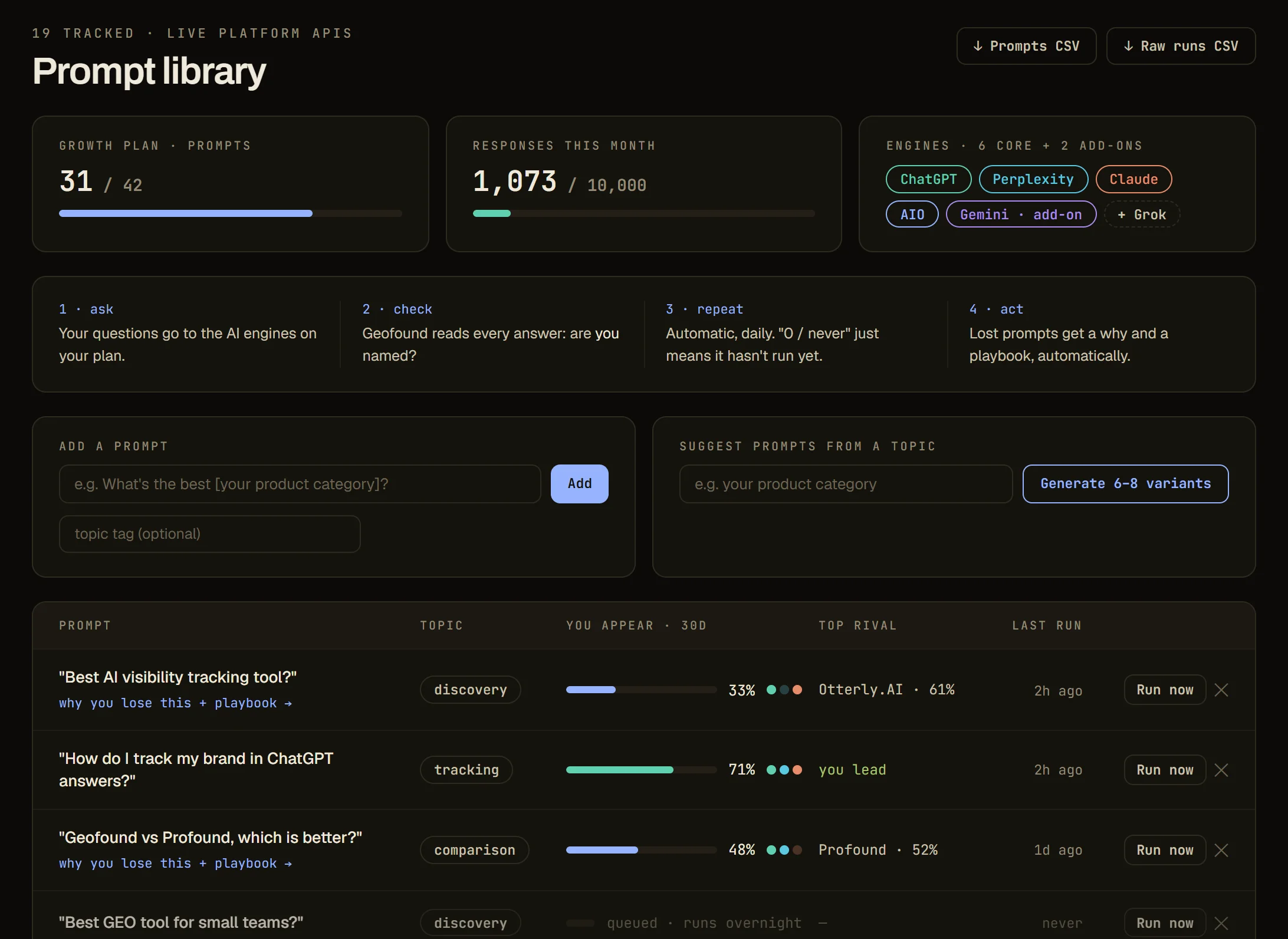
    The Prompt library of Geofound: the questions you track, how often you appear, your top rival and a Run now button on each row
    The Prompt library.
  6. Read your score

    After a couple of minutes your visibility score shows on the Overview page.

    Click Visibility to see the score for each AI.
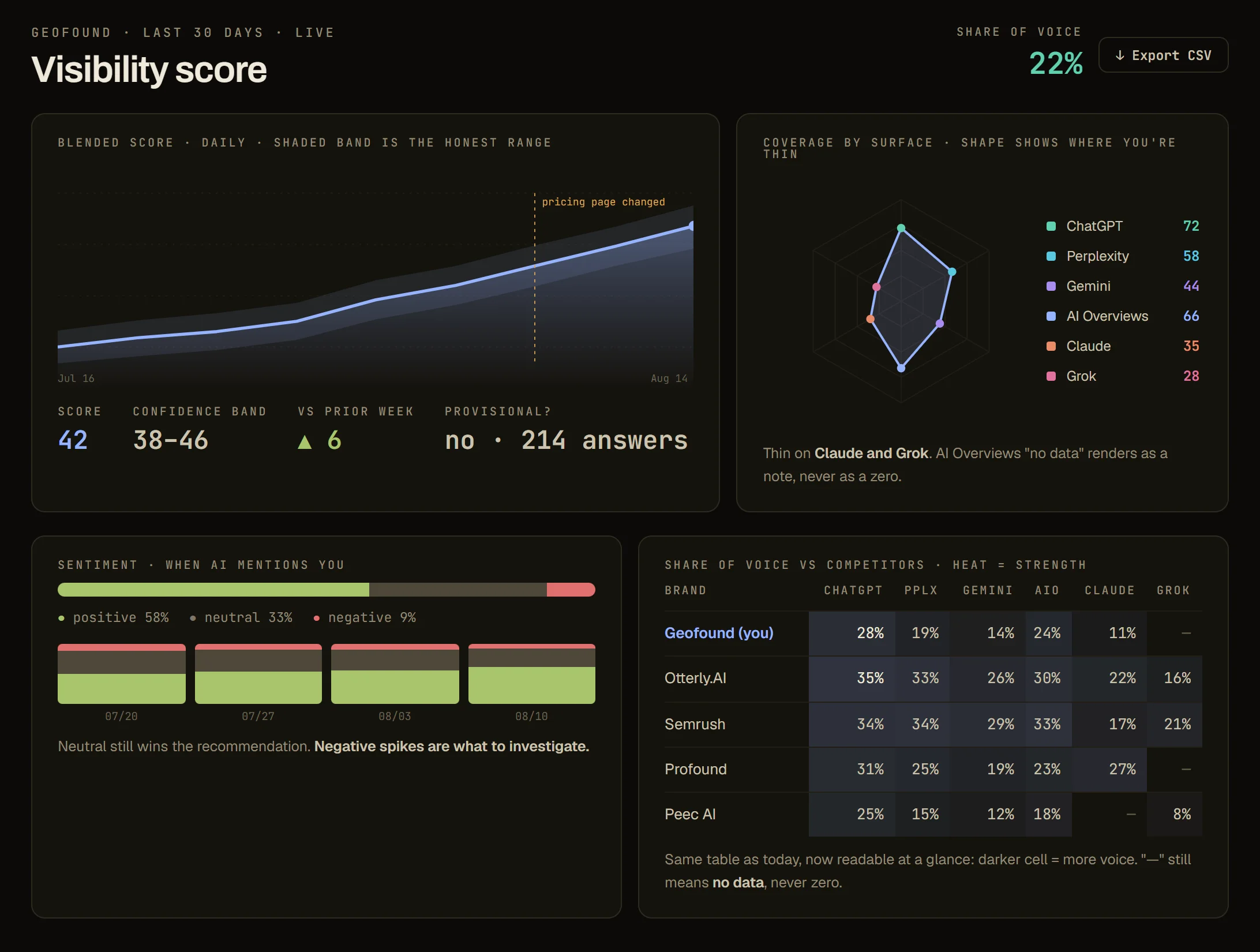
    The Visibility score page of Geofound with a score of 42, a trend line and a score for each AI
    The Visibility score page.
  7. See who is named instead

    Click Competitors. You see which businesses AI names, and how often.
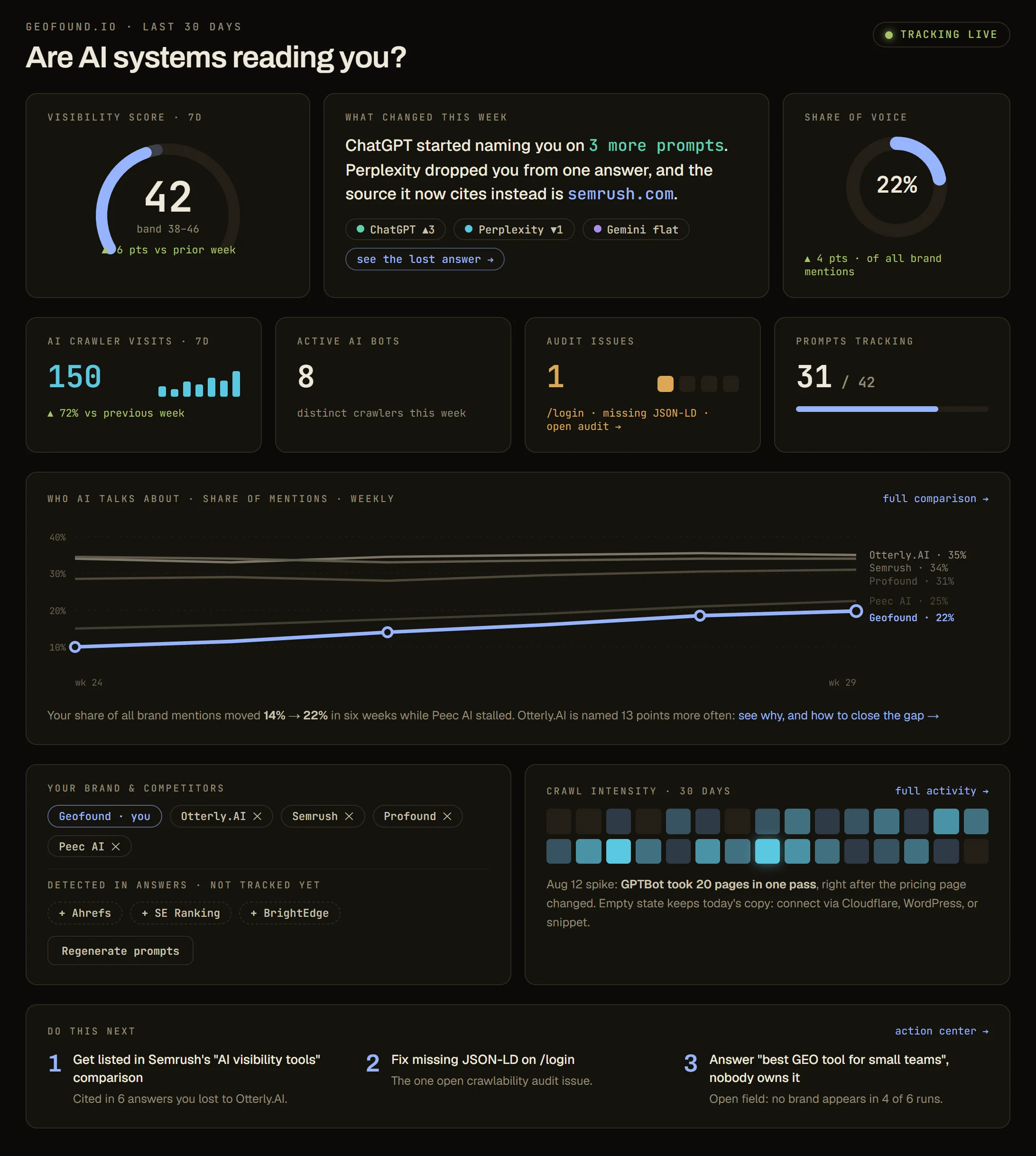
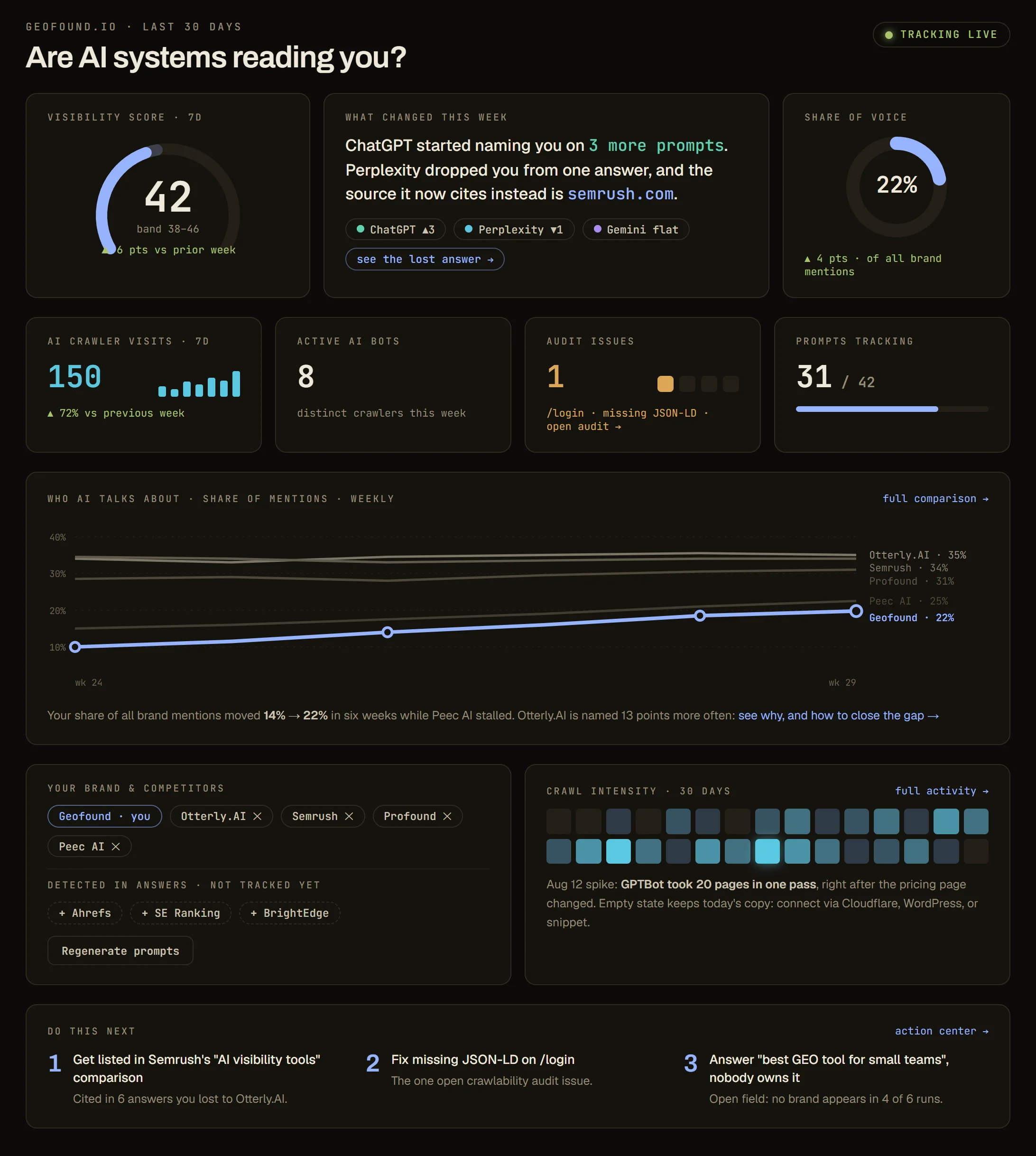
    The Geofound dashboard with the visibility score, share of voice, and a chart of who AI talks about
    The dashboard.
  8. Fix the first thing

    Click Action center. Do the first thing on the list.

    Press Mark done. About a week later, Geofound shows if your score went up.
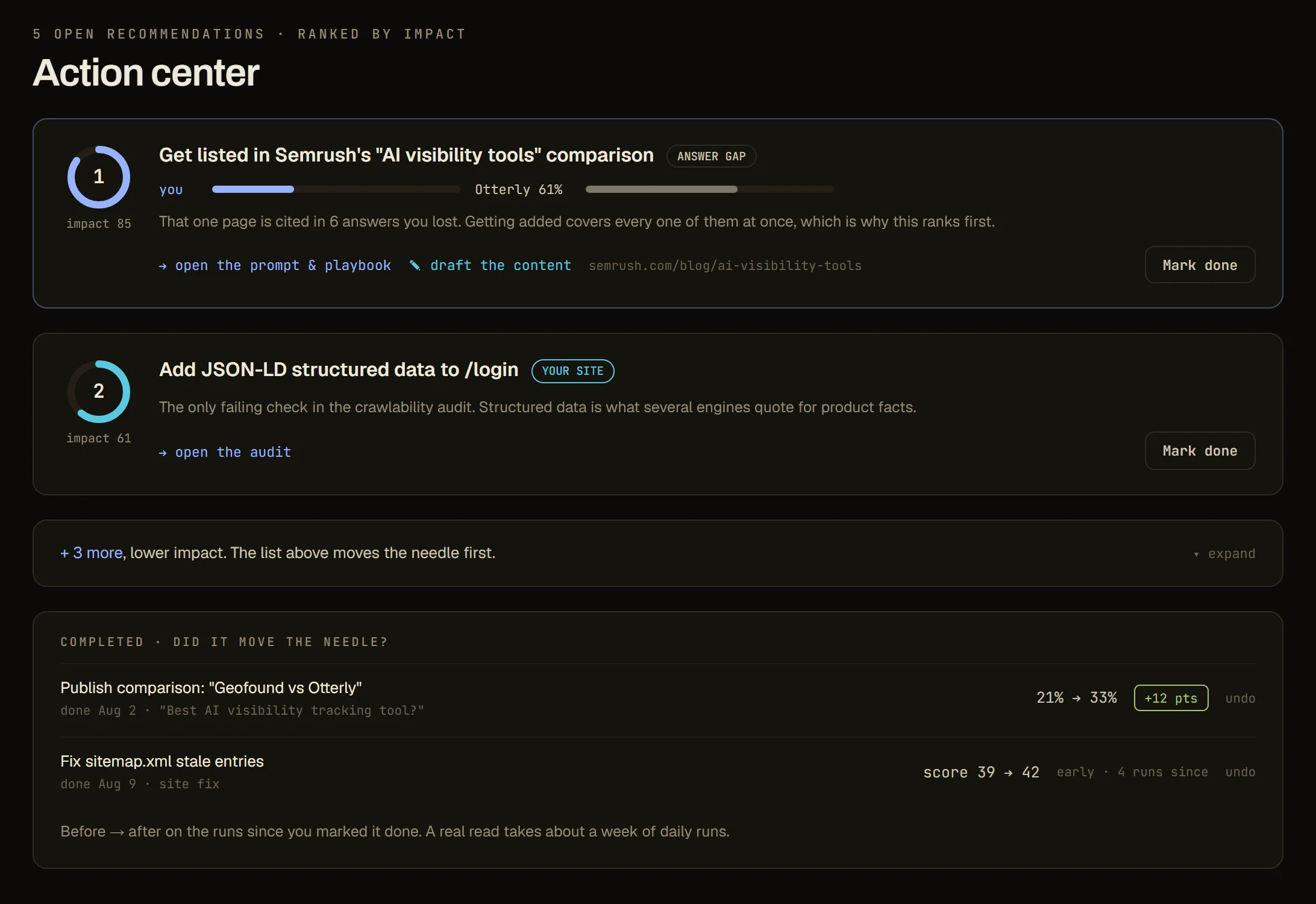
    The Action center of Geofound with a ranked list of things to fix
    The Action center.
  9. Check that AI can read your site

    Click Crawlability audit. Geofound opens your pages the way an AI would and lists what to fix.
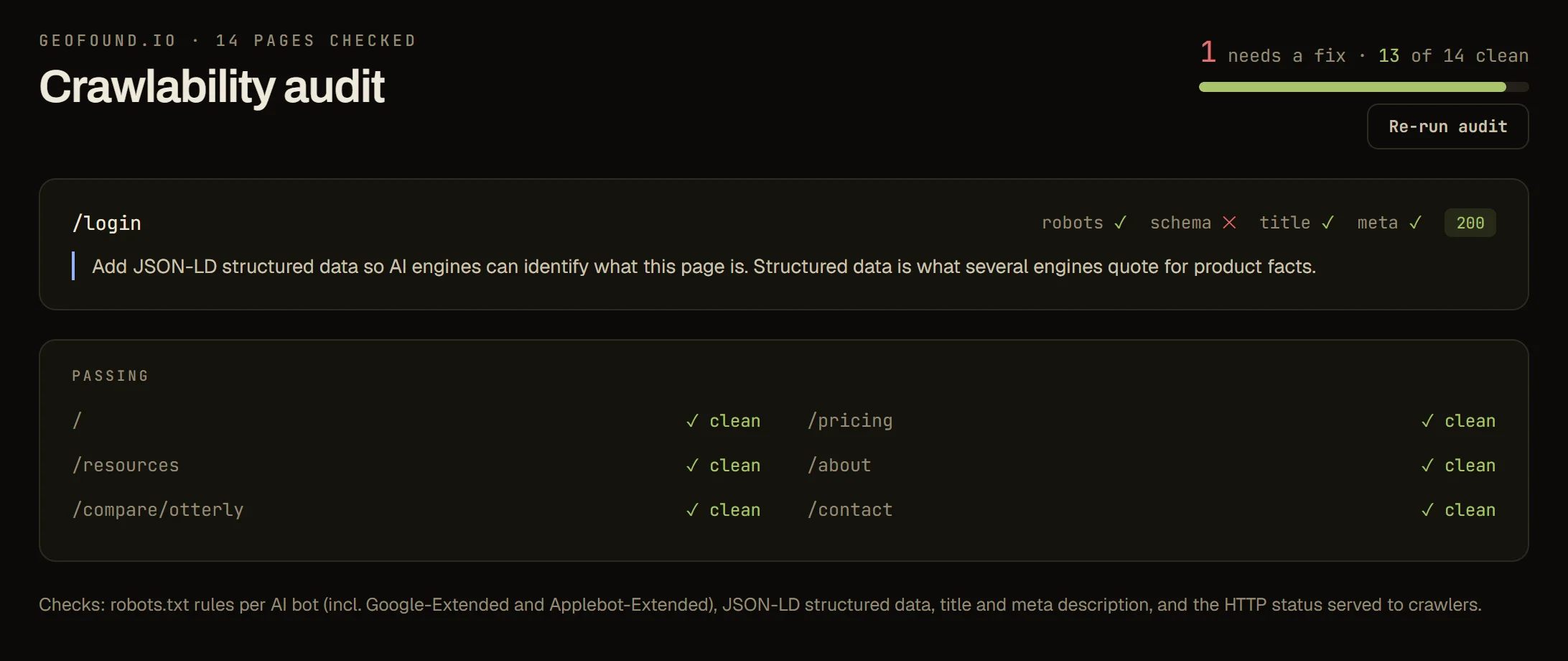
    The Crawlability audit of Geofound: one page that needs a fix and a list of pages that pass
    The Crawlability audit.
  10. Research SEO and adverts

    Click SEO & research, then Configure SEO research. Type your competitors' websites and your keywords.

    Press Review collection estimate, then Confirm collection. Click Paid ads to see your competitors' adverts.

  11. Choose a plan when the trial ends

    After 7 days, pick a plan to carry on. Everything you collected is kept.

What you need and what it costs

What you need

  • An email address.
  • The name of your business and its website.
  • Nothing to install. Tracking works without touching your website.
  • If you want to see which AI robots visit: a paid plan, and access to your website through Cloudflare, WordPress, its code or its log files.

What it costs

  • Free trial, 7 days, no card. ChatGPT and 10 questions.
  • Starter, $39 a month. 25 questions and 3 AI systems of your choice.
  • Growth, $169 a month. 70 questions, 6 AI systems and 3 websites.
  • Scale. All 8 AI systems. The price is agreed with you.
  • Paying for a year costs the same as 10 months.
  • Geofound's own pricing page always has today's prices.

Words used on this page

AI answer
What an AI such as ChatGPT writes back when someone asks it a question.
Prompt
A question you ask an AI. In Geofound, a question you track.
Visibility score
A number for how often AI names you when people ask about your kind of business.
Share of voice
Of all the business names AI gives, how many are yours.
Citation
A web page that AI gives as the source of its answer.
AEO and GEO
Two names for the same job: getting AI to name your business. AEO is short for answer engine optimization.
SEO
Getting your website to show higher in Google's search results. It is short for search engine optimization.
Keyword
A word or phrase people type into Google.
Backlink
A link from someone else's website to yours.
AI robot, or crawler
A program that an AI company sends to read web pages.
CSV file
A simple table file that opens in Excel.