What's new / AI Hub

AI Hub 0.2.15 is the latest version.

Released 23 October 2026, for Windows, Mac and Linux. The AI finds the right skill folder, a call that worked on a second try no longer looks failed, and a skill you switch on is always used. Installed copies show a notice when a new version is out; nothing installs by itself.

Every version

AI Hub 0.2.15

When the AI asks for a skill by the wrong folder name, AI Hub now helps it. If the name matches the end of just one skill's folder, such as canvas-design for skills/canvas-design, that skill is used. The card still shows you its real folder first. If not, the answer lists the skills there and their folders, so the AI can pick the right one.

Sometimes a call fails, the AI tries again, and the second try works. The line under the reply now says that a later call worked. It is no longer red, as if the work had failed. A failure the AI did not fix still shows in red. A long reason in that line now ends with "..." instead of stopping in the middle of a word.

A skill you switch on is now always used in your next message. Before, the Skills page could say Switched on while the next message still left the skill out.

AI Hub 0.2.14

You can now ask the chat to install something from GitHub. Paste the address and say "install it". The AI reads the project first and tells you what it is. A skill is installed as a skill. A program is downloaded from the project's own release page, the file made for your computer. If the program has a tool server, the AI connects it, and its tools work in the same chat. A web app is named as a web app, and nothing is installed.

Each step shows you a card first. The download card names the file, its size and its checksum. An installer gets a card of its own. It opens with its own screens, and you answer them yourself. Nothing is added to your PATH. To let the AI do this, switch on Install programs in Access. It starts switched off.

The AI Hub app from the Microsoft Store does not download programs. There, the card opens the project's release page for you.

Install from GitHub on the Skills page now says what a skill is, and gives an address to try. A project that keeps one skill in many folders, one per AI program, now shows that skill once. Test folders are left out. An address with no skill in it says so plainly: "This is a program, not a skill." It also says how many files it has, and that a tool server goes on Connections. Looking up a project with many skills is much faster.

The parts AI Hub is built with are up to date, with no known security issue.

AI Hub 0.2.13

A card can name more than one connection that is ready. Long names now go on to a new line inside the card. Before, a long line could push the page to the side.

AI Hub 0.2.12

AI Hub now looks for an AI program in the folder its maker's installer uses. It finds it there even when your computer would not. Antigravity, Google's program for your Google plan, is one of them. Scan again also finds a program you installed a moment ago.

When you press Install, AI Hub opens the maker's own download page. Install the program there and come back. The card sees it by itself and shows Sign in. One click signs you in.

Each card shows its ways to connect under plain headings. Its status names the connection that is ready, such as "Antigravity connected". A way the maker no longer allows says why, with no button to press. Google's Gemini CLI sign-in for personal Google accounts is one of them. Antigravity is the way in for those accounts.

Model names read the way the AI program writes them. Each model is listed once, with its thinking levels.

Model lists stay current by themselves. AI Hub reads a list again when its program updates. It also reads it when the list is six hours old, and once a day. When Claude Code or Codex moves to a new folder after an update, the connection follows it.

The Claude Code that AI Hub runs for you is now a newer version.

AI Hub 0.2.11

Settings now shows the folder where AI Hub keeps your conversations, projects and connections. Press Open folder to see it on your computer.

On a normal install that folder sits outside the AI Hub folder. Settings then says that uninstalling AI Hub keeps it, so a new install finds everything again, and how to remove it for good: uninstall AI Hub first, then delete the folder.

The libraries AI Hub is built on are updated to versions with their known security problems fixed.

AI Hub 0.2.10

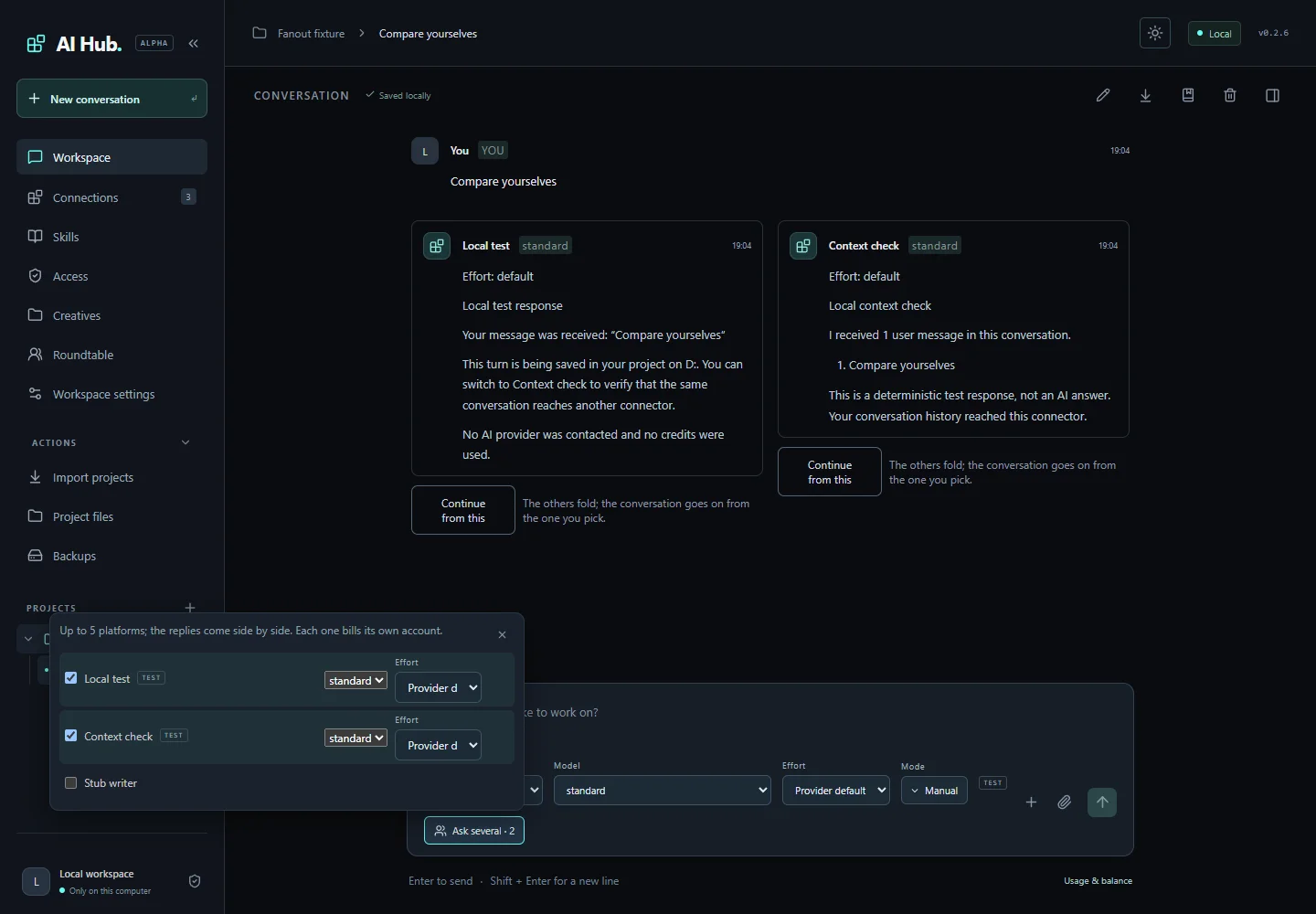
The controls under the message box now sit in one row, as in the Claude app: Platform, Model, Effort, Mode and Ask several. The names above the boxes are gone. Point at a box to see its name.

The row stays in one line when the side panel is open too. A long name is cut short to fit.

With two chats side by side, or on a phone, the controls sit two to a line.

AI Hub 0.2.9

Every AI reply, Roundtable answer and creative now has a flag button. Press it to tell LSALab when a reply is harmful. You can copy the message, or open it in Gmail or your email program with it all filled in. AI Hub never sends a thing by itself. You read the email and send it.

Every dialog fits your window. On a small window, you scroll inside the dialog to reach each field and button.

Every text box and list looks the same in light and dark mode, the Roundtable's too.

AI Hub 0.2.8

You can now use Google's Antigravity in AI Hub with your Google account, including a Google AI Pro plan. Press Sign in on Google's card. A window opens where you sign in once, and AI Hub sees by itself when you are done. Then pick Antigravity in the chat, with any of the models your plan offers.

Paste a platform's website in Add connection, such as aistudio.google.com, and its card opens with the ways to connect it.

When an AI program is missing, its card has an Install button. AI Hub installs it for you, or opens the company's download page when the company has its own installer.

If a sign-in does not work, AI Hub shows you what the AI program said, so you know what to do next.

The platform list is up to date:

  • DeepSeek, Together AI, Novita, Cohere and Perplexity use the addresses the companies give today.
  • The Devin CLI and Qoder cards offer a sign-in with your own account.
  • The Ollama card offers its cloud models with your Ollama key.
  • The Qwen Code card explains how to use it with your Alibaba Cloud Coding Plan or an API key.
  • Windsurf is listed under its new name, Devin Desktop.

When you import a file you imported before, AI Hub tells you nothing new was added.

AI Hub 0.2.7

AI Hub now runs on Windows, on a Mac with Apple silicon, and on Linux. Each has its own file. The file brings everything AI Hub needs, so you do not install anything else first.

On a Mac or Linux, AI Hub finds the AI programs you installed with Homebrew and the other usual installers.

Adding a connection never changes another connection. A setup you started and did not finish carries on where it stopped.

A connection that works again after a problem shows as working, without setting it up again.

AI Hub asks before an AI reads the files where your other accounts keep their sign-ins, such as cloud and coding tools.

When you choose Always allow for a change to several files, it covers those same files only.

A backup keeps which answer you chose when you asked several platforms at once. Skills from a backup come back switched off, so you choose which ones to use.

In Plan mode nothing is downloaded, installed or saved.

On your phone you can chat and look at your work. Programs on the computer are set up on the computer.

The Windows installer works in any folder, even one with brackets in its name.

The terms of use come in the download as TERMS.txt.

AI Hub 0.2.2

The message box grows with what you type.

The Delegate task form is gone from the composer. Ask a platform in the conversation instead.

The version badge shows the version that is running.

The Gemini model list shows only models that answer messages, each name once. A model Google has retired no longer appears.

A connection whose API key is refused is removed instead of staying with the wrong key.

Ask several works in a folder that has no commit yet.

When a platform has many tools, the list a conversation receives names them instead of describing all of them, so Claude Code takes it inline.

The card that asks before a native agent's tool names the tool.

On desktop the sidebar's navigation stays in place while the list scrolls. On the phone the whole drawer scrolls.

The runs list refreshes gently while nothing runs, the Changes panel refreshes when you return to the window, and notices clear on their own after eight seconds.