Free AI Software, Paid AI Services: What You Actually Pay For

AdDeck and AI Hub are free to download and use. A connected AI service can still charge your account for a request or use credits to make an image or video. The application's price does not include every service you choose to connect.
Before starting a task, check which account supplies the access and what the proposed price covers. Use the worksheet below to record the estimate and compare it with the provider's reported usage afterward.
Separate the application from the provider
The AdDeck product page explains that you supply an AI plan or key. AdDeck adds no charge of its own; connected services may charge separately. You can support development, but payment is optional.
In AI Hub, each platform uses your own account too. The application displays the usage information those platforms report.
Check the provider's terms to find out what a particular task will cost. The free download does not settle that question.
The same distinction applies to where the application runs. A local interface can store your files and connections on your computer while sending a request to an external AI provider. Local software does not automatically mean offline inference or free generation.
The application’s price does not include every connected service. Check the account and access arrangement.
Know which kind of access you connected
Look at the type of connection you added:
| Arrangement | How it is accounted for | What to verify |
|---|---|---|
| Subscription access | Use within a provider's plan and limits, under its terms | Whether the integration is included and which limits apply |
| API access | Requests charged to a provider account or project | Model rates, usage units, tools and account controls |
| Media credits | Credits or another allowance used for images, video or audio | Model, resolution, duration, attempts and credit treatment |
A subscription is not interchangeable with an API key. OpenAI's billing documentation says ChatGPT and the API platform have separate billing systems. API usage is billed separately from a ChatGPT subscription.
Do not extend that statement into a universal rule about all integrations. A supported sign-in connection can have different terms from an API connection. Verify the specific route you are using and the current terms of the account supplying it.
An API key gives access under a provider account or project. Identify that account and its billing arrangement before adding the key. Keep the key private.
Understand the units on a price page
Text-model API prices commonly distinguish input and output tokens. Tokens are units used to process text and other supported inputs; they are not a fixed number of words. The prompt, attached material and any conversation context sent with it contribute to the input.
Rates can differ by model and feature. Tools, caching, storage or other services may have separate accounting. Google's Gemini API billing guide describes charges involving input, output and cached tokens, with free-tier availability depending on the model. Anthropic's pricing page lists input and output rates per million tokens for each Claude model.
For a media job, check the model, duration and resolution in the estimate. Include separately charged audio or other steps. A price quoted for a different model or output size is not enough.
Record the currency or credit unit and the date you checked it. If the price is in credits, use the provider's own purchase or allowance terms to understand their monetary cost. Do not assume credits have a universal cash value across plans.
Work through an estimate before approving it
The following calculation uses hypothetical rates, not a named provider's current prices.
Assume a job sends 20,000 input tokens and receives 4,000 output tokens. For the example, input costs $3 per million tokens and output costs $15 per million tokens:
| Part | Calculation | Illustrative cost |
|---|---|---|
| Input | 20,000 ÷ 1,000,000 × $3 | $0.06 |
| Output | 4,000 ÷ 1,000,000 × $15 | $0.06 |
| Total for one request | $0.06 + $0.06 | $0.12 |
Three identical requests under those assumptions would cost $0.36. Actual requests may send different amounts of context or receive different amounts of output. Additional tool or storage charges are outside this example.
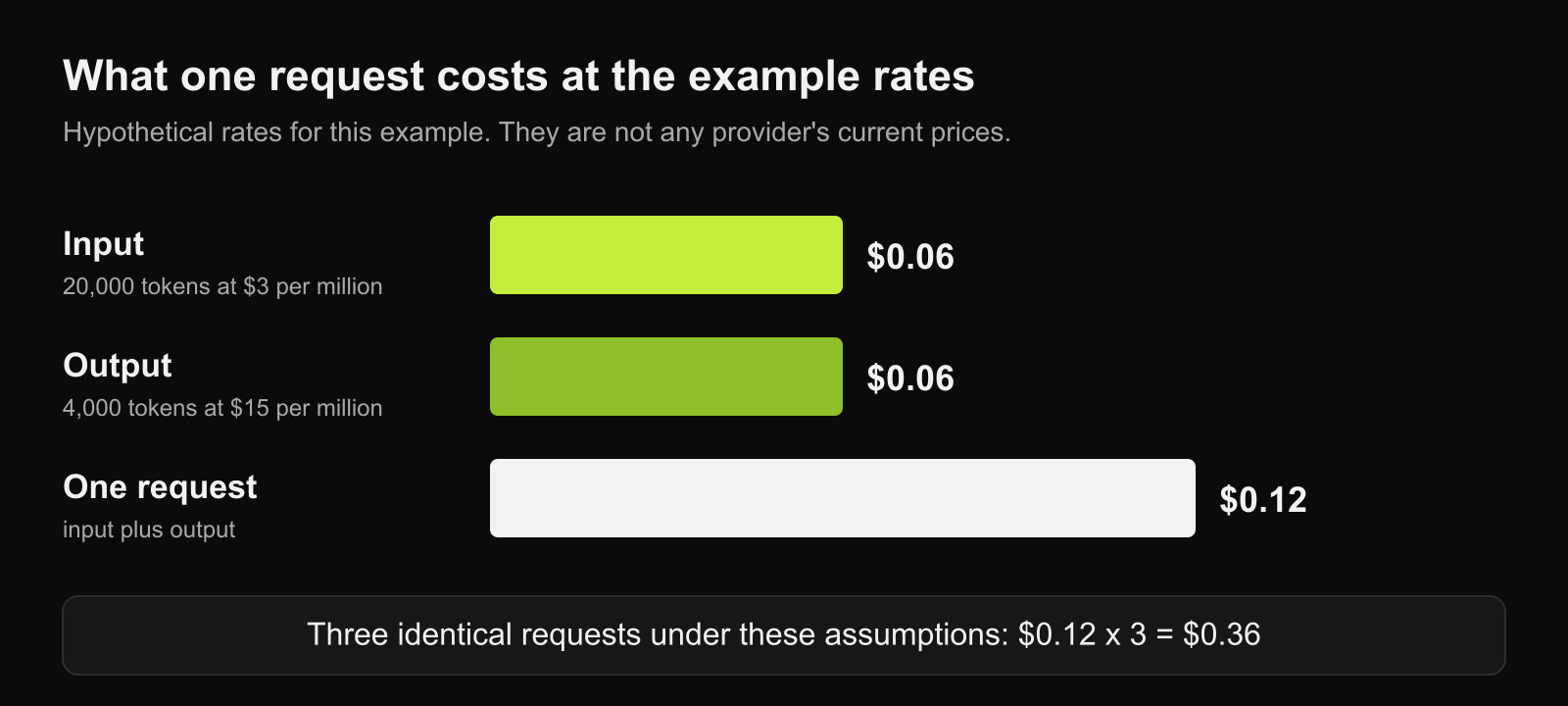
Replace the invented rates with the provider's current rates before using the calculation for a real job. For a request priced per image or per second of video, use those units instead of applying the token formula.
If you do not know the expected usage, show a range and explain the assumptions. An estimate with unknown output length is not a guaranteed final bill.
Include another attempt in the decision
A production estimate should make clear whether it covers only the first attempt or includes further work. A rejected image may require another generation. A video may need separate narration. Whether a failed or rejected request consumes an allowance depends on the provider's rules and the actual request status.
Do not infer the result from the word “failed”. Check whether the provider recorded a charge or deducted credits. A job can fail after an external service has already performed paid work.
For a media job, record each planned step separately:
One still-image generation:
One video generation from the approved still:
Narration, if separately charged:
Other required steps:
Included additional attempts:
Estimated total:
If you requested one video and the plan proposes three generated concepts, decide whether you want to pay for all three before work starts. The creative brief template has a field for what approval covers.
Comparing several assistants uses several connections
Asking multiple AI platforms the same question can use the allowance or billable usage associated with each connection. The charge is not necessarily identical across them. One may use subscription access, another an API account and another an available free tier.
Long follow-up discussions can add more requests. A conversation's earlier material may also be included as context, depending on the integration. Check what the connection sends and which usage information the provider exposes before treating a short message as a predictably cheap request.
Use a comparison when it helps a decision. If the remaining uncertainty can be resolved by reading one source, an extra round of complete answers may be unnecessary. How to Compare AI Answers Without Mistaking Agreement for Accuracy covers keeping a comparison small.
Read the scope of the spending control
AdDeck's public page describes showing prices before paid steps and waiting for approval. Read the price alongside the plan: which service, what output, how many attempts and which parts are covered?
AI Hub's page describes a spending guard for calls the application starts itself. That wording does not establish a limit on every charge a connected provider can make, including usage outside the application.
Read the balance, estimate and bill separately. The balance shows available funds or allowance; the estimate describes planned work; the bill records charges. The application's usage display is limited to what the connection reports.
Check whether a control blocks work, asks for approval or merely displays a warning. Confirm its coverage before depending on it for a paid task. Do not treat an estimate, notification or dashboard number as a hard limit unless that behavior has been established.
Hypothetical example from this article: 20,000 input tokens at $3/million plus 4,000 output tokens at $15/million gives $0.12 per request. Tool, storage and other charges are excluded.
Keep a cost worksheet for the job
For a small job, record these fields for each service involved:
| Field | What to record |
|---|---|
| Provider and account | The specific account or project supplying access |
| Connection type | Subscription, API or media allowance |
| Task | What the service will do |
| Model and settings | Relevant model, duration, resolution or tools |
| Pricing source | Current official price page or service estimate |
| Estimate | Usage assumptions, amount and unit |
| Approval | What work has been approved and by whom |
| Actual usage | Provider-reported charge or allowance consumed |
Keep the account name in the worksheet, not its secret key. Record unknown values as unknown. If a provider has not yet reported usage, an empty field is more accurate than a guessed zero.
After the task, compare the estimate with the recorded usage. If they differ, check the model, amount of context, extra attempts and paid steps. Keep that record for the next estimate.
Before approving paid work, identify the account being charged, the steps in the estimate and whether another attempt is included. Ask for the missing detail if the plan leaves any of those unclear.
Citations (3) showhide
- OpenAI. OpenAI's billing documentation
- Google. Gemini API billing guide
- Anthropic. pricing page