AI Skills and MCP Tools: What Each Does, and What Access It Needs

An AI skill provides reusable instructions. A tool performs an operation, such as reading a file or creating a document. MCP is a protocol that lets an AI application connect to servers offering tools and other context.
Review each part before connecting it. What does the skill tell the assistant to do? Which operations does the tool offer? Where does the server run, and whose account does it use?
Start with the task and the access it needs. You can make those decisions without learning the protocol specification.
What a skill contributes
A writing skill might instruct an assistant to use direct language, preserve citations and avoid invented anecdotes. A research skill might specify which sources to use and how to record uncertainty.
Those instructions help define a method. They do not establish that the assistant has read a source, changed a file or passed a quality check. Ask for the result and the evidence relevant to the task.
Read a skill before enabling it. Check whether it fits your intended voice and whether it changes the task's scope. Instructions to contact people, buy services or publish work need the same attention as any other request to take those actions.
Applications handle skill packages differently, including any bundled scripts. Check how yours handles the package you plan to enable.
What a tool contributes
A tool gives the assistant a defined operation. A file-reading tool can return document contents. A document tool can write an output. A mail tool may offer separate operations to search messages, draft a reply and send it.
The available operation determines what is possible. An assistant writing a convincing response about your calendar does not prove it has a calendar connection. Look for the actual result of an authorized read.
Read and write access also differ. Summarizing a public sample document does not need permission to change an entire project folder. Drafting a message does not require sending it. Choose the access needed for the task and expand it only when there is a concrete reason.
| Item | What it supplies | What to inspect |
|---|---|---|
| Skill | Instructions for how to work | Scope, assumptions and cited evidence |
| Tool | A callable operation | Inputs, permissions and side effects |
| MCP connection | A way to expose capabilities | The server and capabilities it exposes |
A protocol connection does not certify the server or its tools.
Where MCP fits
The MCP architecture documentation describes an AI application acting as a host, with clients connecting to servers. Servers can run locally or remotely and can expose tools, resources and prompts. MCP defines their communication; it does not determine how the application uses its model or manages all supplied context.
For a reader choosing a connection, the practical question is what the server offers. “MCP connected” is insufficient detail. Ask which operations are enabled and which files or accounts they can reach.
A local server is a program on your computer. A remote server runs elsewhere. Either can participate in a workflow that sends information to an AI provider. Follow the data used by the particular task.
Follow one document through the workflow
Consider a fictional task: summarize a public product specification into a buying checklist. The assistant has a writing skill and a file-reading tool.
The workflow might be:
- You supply the specification and the requested output.
- The file tool reads the permitted document.
- The AI application includes the relevant contents in a request to the selected provider.
- The model writes the checklist using the task and skill instructions.
- You review the draft before authorizing any write to a shared location.
This is an illustrative workflow, not a claim about every application's implementation. It separates the instructions, document access, provider processing and final action so you can check each part.
Compare the finished checklist with the specification. Reading the right document is only the first step toward a correct result.
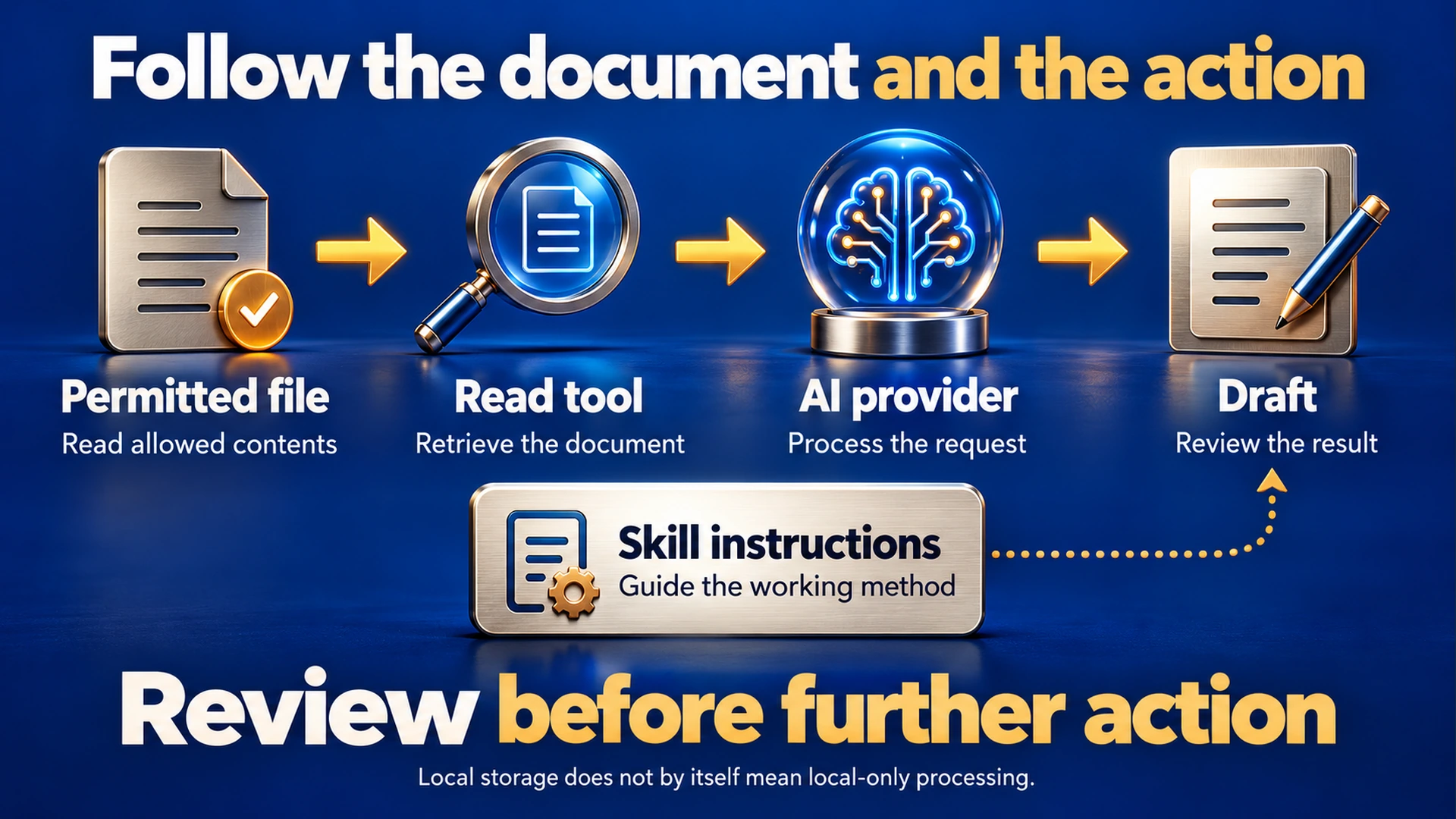
Illustrative workflow for a public sample document. Check where your actual connections send data.
Local storage and remote processing
“Saved on your computer” describes where a file or chat is stored. To understand processing, also ask where its contents go when you use the connected AI or a remote tool.
Before giving an assistant a private document, identify the provider that will receive the request and any tool service that will receive data. Check whether a full file, a selected excerpt or additional metadata is involved. The answer depends on the application and connection.
Use a harmless sample document for your first test. It lets you confirm the workflow without exposing customer information or credentials. If the task needs sensitive material, determine the permitted data and recipient before supplying it.
Keep API keys out of ordinary prompts and source documents. A configured account connection is the place to grant the supported access; pasting a credential into a conversation introduces another copy that you must manage.
Review the action, data and consequence
Use a small permissions table before enabling a capability:
| Proposed action | Data needed | Consequence to review |
|---|---|---|
| Read a public sample file | That file's contents | Contents may enter the provider request |
| Save a draft locally | Draft text and destination | A file is created or changed |
| Read a customer folder | Permitted files in that folder | Private material may be included |
| Send a message | Recipient and final message | Another person receives it |
| Generate paid media | Brief, references and provider account | Credits or money may be spent |
| Delete a document | Exact target | Work may become unrecoverable |
This is a decision worksheet, not a claim that every tool offers all these operations. Review the actual permission options available in your application.
For actions with an external consequence, review the concrete result before approval. A message needs an exact recipient and body. Paid generation needs a price, scope and retry limit. A deletion needs an exact target.
Conceptual review flow. Check the implementation and permissions in the application you use.
Check local server installation too
Tool permissions are only part of the picture when connecting a server that runs on your computer. Installing or starting that server can execute a program before an assistant makes its first tool call.
The MCP security guidance discusses local-server risks and calls for consent that shows the command being executed. Review the source and publisher, the startup command and the access restrictions. Do not treat a protocol label as a certification of the software.
Check what “read-only” enforces in your application. Restricting the tools an assistant can call does not, by itself, establish the filesystem and network permissions of an installed program.
Treat retrieved instructions as document content
A document or web page can contain text telling the assistant to ignore your request, reveal information or contact another service. The text may appear in a normal paragraph, a hidden element or a tool result.
For your workflow, treat that material as content to analyze. It does not gain authority because a tool returned it. A buying-guide task may quote a vendor's instructions, but those instructions do not authorize the assistant to send your files elsewhere.
Use tools with appropriate access limits and inspect unexpected requests. A reminder in a prompt can help state your intent; actual permissions determine which operations are available.
How AI Hub describes these controls
The AI Hub product page describes reusable skills, tool servers and per-tool rules. It says new skills start disabled and programs bundled inside skills are not run. It also distinguishes local chat storage from messages sent to the selected AI.
Those descriptions help you decide what to inspect when setting up the app. For a particular connection, confirm the enabled operations and test one permitted action before relying on the workflow. A general product description cannot verify every third-party server you might add.
A short connection checklist
Task:
Skill used and instructions reviewed:
Server or tool publisher:
Server runs locally or remotely:
Enabled operations:
Files and accounts accessible:
Data sent to the AI provider:
Data sent to other services:
Write, send, delete or paid actions needing approval:
Harmless sample used for the first test:
Expected result and how it will be checked:
Test one tool with a permitted sample document. Check the result before adding the access needed for a larger task.
Related guides
Citations (2) showhide
- Model Context Protocol. MCP architecture documentation
- Model Context Protocol. MCP security guidance